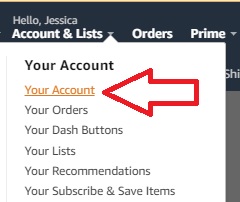
Step 1: Make sure you are logged into Amazon. On the right side of the homepage, click on “Your Account” from the Accounts and Lists dropdown menu.
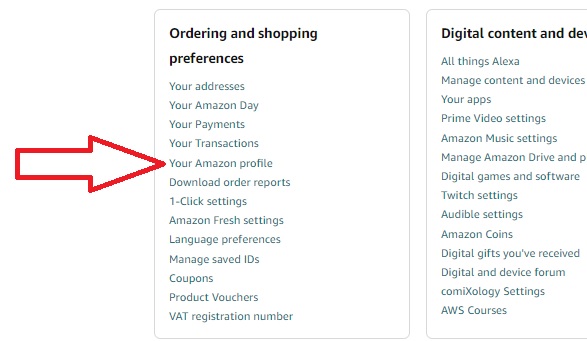
Step 2: Under Ordering and shopping preferences, click on “Your Amazon Profile.”
Step 3:All of your product reviews will be listed on the right side under Community Activity. Find the review you want and click on “See Full Review.”
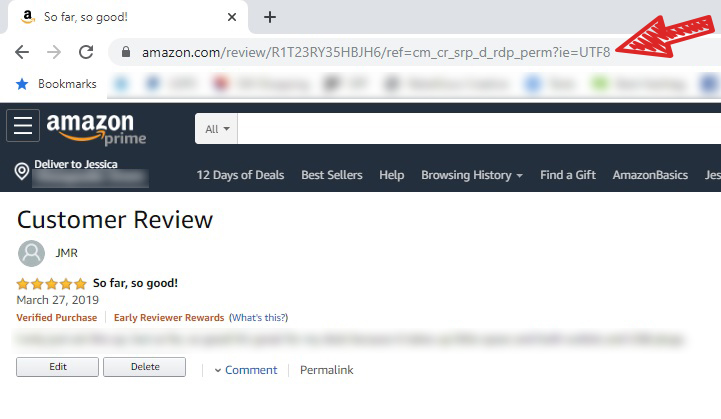
Step 4: Your review should be on the screen. At the bottom of your review, click on “Permalink.”
Step 5: The URL at the top of the page is the direct link to your Amazon review. Highlight it, right click, select “copy,” and voila! You can now paste the link.
Want more swoons, banter, and “oh no, there’s only one bed” energy? Subscribe and I’ll keep you in the loop.
We use cookies to ensure that we give you the best experience on our website. If you continue to use this site we will assume that you are happy with it.